

In the world of digital marketing and web design, forms are one of the most important elements for capturing leads, generating conversions, and strengthening communication with users. From simple contact forms to advanced registration, surveys, or sales forms, the way they are designed and configured can make the difference between gaining a potential client or losing them.
In this context, Elementor, one of the most popular WordPress visual builders, has become a key tool. Its Form Widget allows you to create forms without needing programming knowledge, offering flexibility and customization that suit both small businesses and large companies.
In this complete guide, you will learn how to create forms in Elementor step by step, which are the best design practices, which integrations are most effective, and how to optimize them to improve user experience and your website’s SEO in 2025.
One of Elementor’s advantages is that it provides different functionalities for your website without the need to install other plugins, including web form plugins.

Why are forms so important in a digital strategy?
Connection point between users and brands
Forms allow companies to collect key information from their visitors: names, emails, preferences, and needs. In other words, they turn an anonymous visitor into a qualified lead.
Key functions of forms on the web
- Lead generation: newsletter sign-ups, promotions, content downloads.
- Newsletter subscription: web forms allow you to capture data from people interested in the services or products you offer. This way, they can subscribe to mailing lists and you can send them useful information to help these leads progress in the “customer journey”. Elementor lets you integrate its forms with the most widely used Email Marketing and CRM tools on the market.
- Customer service: contact and technical support forms.
- Sales processes: payment forms, bookings, or quotes.
- Interactivity and community: surveys, opinion, and feedback forms.
According to a HubSpot study, websites that use optimized forms increase their conversions by up to 25% compared to those that do not include them or manage them poorly.
How to Create Forms in Elementor Step by Step
1. Install and Activate Elementor Pro
The form widget is only available in the Elementor Pro version. Once activated, you can drag and drop the form onto any page or template.
2. Insert the Form Widget
-
Open the page with Elementor.
-
Drag the Form widget to the desired area.
-
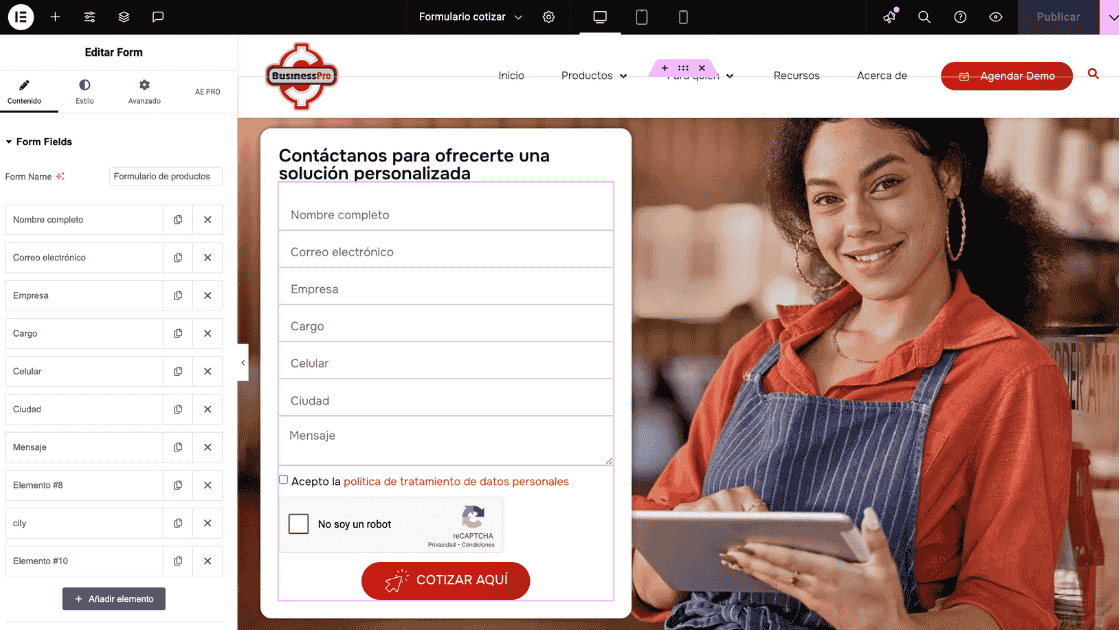
Configure the initial fields (default: Name, Email, Message). DO NOT leave the default names, or you will receive many spam entries and robot attacks. Change the name of each field according to the data you are capturing; this will also make it easier to query the records, since the field name will appear in the records column.
- Give the form a specific and clear name, do not leave the default “New form” name set by Elementor; if you have several forms on your website, you will be able to consult the records by the form name.
3. Customize the fields
You can add different types of fields according to your goals:
- Text and text area.
- Multiple selection or dropdowns.
- Checkboxes and radio buttons.
- File upload fields.
- Date and time.
- Don’t forget to include a Captcha verification field and acceptance of personal data processing, to avoid habeas data issues.
4. Configuration of actions after submission
One of Elementor’s most powerful features is the ability to define what happens after the user submits the form. Some options include:
- Send a confirmation email.
- Redirect to another page (example: thank you page).
- Integrate with email marketing tools like Mailchimp, ActiveCampaign, or HubSpot.
- Save entries in the WordPress database.
5. Form Style and Design
The visual design influences the conversion rate. Elementor allows you to customize:
- Colors, fonts, and buttons.
- Spacing between fields.
- Borders and shadows.
- Validation icons.
An attractive form, aligned with the brand’s visual identity, builds trust and improves the user experience.
Best Practices for Forms in Elementor
1. Keep It Simple
Long forms tend to discourage users. Ask only for essential information to reduce friction and increase conversions.
If you are going to use the same form on multiple pages, you can create it as a section-type template within Elementor, so you can centralize editing in one place and insert it on any page or post.
2. Use Real-Time Validation
Set up immediate error messages when a field is incomplete or incorrectly filled. This prevents frustration and enhances the user experience.
3. Optimize for mobile devices
Over 60% of web traffic comes from mobile devices. Make sure the form is fully responsive and easy to complete on a smartphone.
4. Implement security and data protection
- Enable reCAPTCHA v3 or hCaptcha to prevent spam.
- Inform users about how their data is used through a privacy notice.
- Comply with regulations such as the GDPR in Europe or the Habeas Data Law in Colombia.
5. Conduct A/B testing
Experiment with different versions of the form: changes in colors, button text, number of fields, or placement on the page. This will help you identify which design achieves the most conversions.

Most useful integrations for Elementor forms
With email marketing platforms
- Mailchimp: Ideal for automated campaigns.
- Mailerlite: is our preferred platform, allowing you to do the same as Mailchimp but at a more affordable cost.
- ActiveCampaign: Excellent for advanced segmentation.
- ConvertKit: Popular among content creators.
CRM and sales tools
- HubSpot: To centralize leads information.
- Zoho CRM: Comprehensive customer management.
- Salesforce: Powerful for large companies.
From automations
- Zapier: Connects Elementor with more than 2,000 applications.
- Integromat (Make): Automates complex workflows.

Common mistakes when creating forms in Elementor
1. Forms that are too long
Requesting too much information in a single interaction may cause users to abandon the form.
2. Not setting up success or error messages
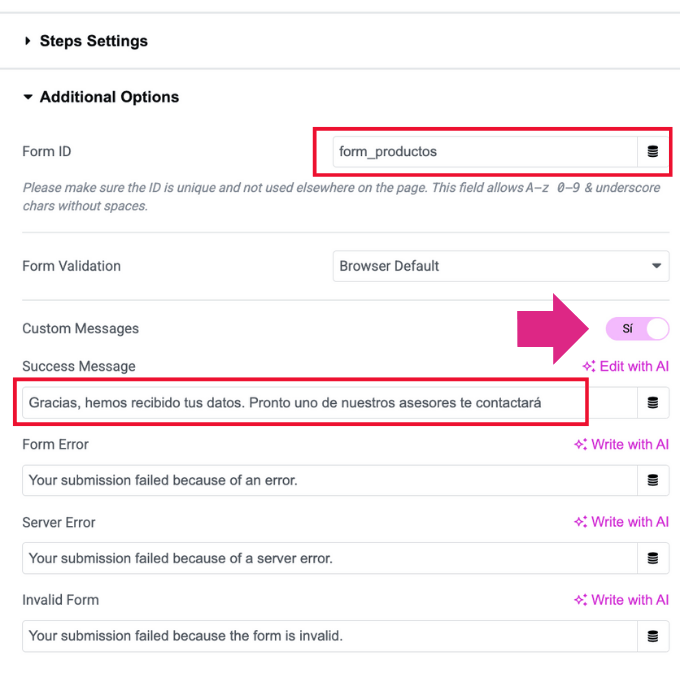
Elementor provides the response messages in English, and one of the most common mistakes is not translating or customizing the messages that the form should show to the user, both success and error messages. These messages are configured inside the form element by expanding the “Additional Options” section and enabling the “Custom Messages” option. A user who does not receive confirmation may become distrustful. The new version of Elementor even helps you generate these messages through its integrated AI (artificial intelligence).
3. Poor color choice
If buttons or fields do not contrast with the site’s design, users will not identify the form as interactive.
4. Lack of testing
Launching a form without testing it across different browsers and devices is a common mistake. Check the messages, responses, and ensure the data is stored correctly.
5. Not configuring email sending via SMTP
On a WordPress website by default, the application will try to send form email notifications using php mail, but this is an insecure practice, often blocked by many hosting providers and flagged as spam by email services. That’s why it is essential to configure your WordPress to send email notifications via SMTP. To do this, you can install a plugin like Solid Mail or a similar one. This will allow your email notifications to be sent from a valid email account through a secure protocol, ensuring that messages reach the inbox.
In a future article, we will explain how to properly configure SMTP sending in WordPress.
SEO Optimization and Usability of Forms
Loading Speed
A poorly optimized form can slow down the page. Use quality hosting and deferred script loading.
User Experience (UX)
Place the form in strategic locations, such as above the fold, in moderate pop-ups, or on contact pages.
Effective Microcopy
The text accompanying the fields influences the user’s decision. Example: instead of “Submit”, use “I want more information”.
Frequently Asked Questions (FAQs)
1. Do I need Elementor Pro to create forms?
Yes. Forms are only available in the Pro version of Elementor. Contact us if you need to install Elementor Pro on your website, we can help you with that, as we have an agency license since version 1.
2. Can Elementor forms be integrated with WhatsApp?
Yes, through redirects or external integrations with Zapier or specialized plugins.
3. How to prevent spam in forms?
By enabling Google reCAPTCHA, hCaptcha, or configuring anti-spam filters in WordPress.
4. Can I use Elementor forms in online stores with WooCommerce?
Yes, you can integrate them to manage quote requests, support, or customer registrations.
5. Do Elementor forms affect SEO?
Indirectly, yes. Although they don’t rank by themselves, they improve the user experience, which influences engagement metrics and conversions.
5. Can I check the submissions or records of Elementor forms?
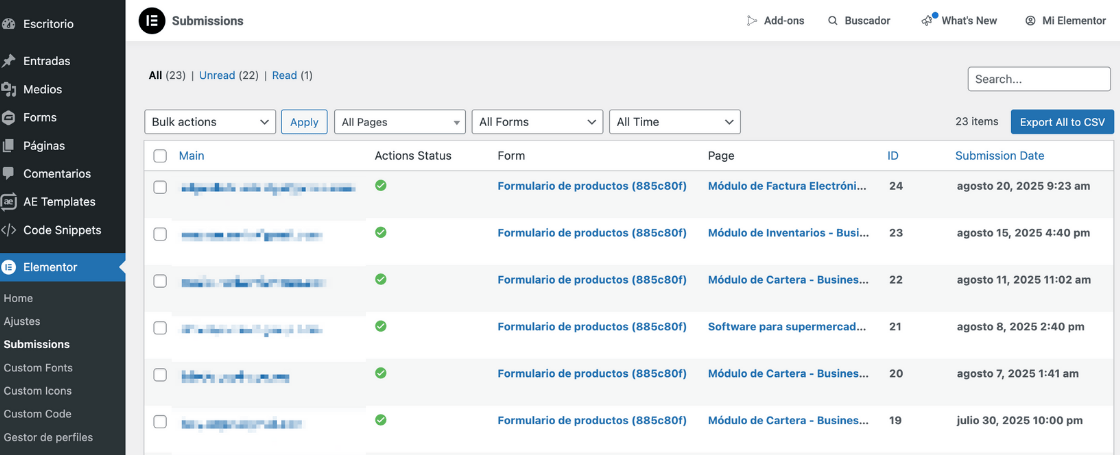
Of course. Form records can be viewed from the Admin panel by going to Elementor – > Submissions. There you can search by form name, by page, or by date range. You can export the results to a CSV file and import them into Excel for local processing.
In conclusion
Forms created in Elementor are much more than simple fields to fill out: they represent a gateway to interaction, conversion, and customer loyalty.
With proper configuration, attractive design, smart integrations, and best practices for security and usability, forms can become one of the most valuable tools in your digital strategy in 2025.
Remember: keep your forms simple, clear, and functional. Continuously test, measure results, and adapt your strategy. This way, you can ensure that every Elementor form not only captures data but also generates real growth opportunities for your business. The digital world is full of opportunities; it’s time to take advantage of them. Click here and start today!

I am a Communications Professional and Journalist with more than 7 years of experience as a Community Manager, Content Manager, and Web Content Writer.
I specialize in creating, planning, implementing, and evaluating social media strategies that help businesses strengthen their online presence, engage their audiences, and achieve their marketing objectives. I have extensive experience managing social media communities, developing content strategies, and producing high-quality digital content tailored to each client's goals and brand identity.


