

A website is not just a digital showcase: it is the epicenter of any company’s or project’s digital marketing strategy. However, having a website does not guarantee results. Factors like loading speed, user experience, site architecture, content, and SEO determine whether your site attracts and converts visitors into customers. This is where a web audit comes in, a thorough process that helps identify errors, optimize performance, and boost visibility on search engines.
In this article, you will learn step by step how to conduct a website audit in 2025, which tools to use, and the best practices to achieve an efficient, secure, and profitable site.
What is a web audit and why is it important?
A web audit is a comprehensive analysis of a website’s technical aspects, content, SEO, design, and user experience (UX). Its purpose is to evaluate how well the site is performing and identify areas for improvement.
Main benefits of a web audit
- Improved Google ranking thanks to SEO error correction.
- Increased conversion by optimizing user experience.
- Greater security against cyber attacks or vulnerabilities.
- Faster performance, which reduces the bounce rate.
- More effective content strategy based on real data.
According to data from Google, 53% of users leave a website if it takes more than 3 seconds to load. On the other hand, a web audit helps to identify and fix these critical issues.
Types of web audits
1. SEO Audit
Evaluates factors such as keywords, internal links, backlinks, metadata, and optimized content.
2. Technical Audit
Focuses on speed, indexing, web architecture, crawl errors, and mobile compatibility.
3. Content Audit
Analyzes the quality, originality, relevance, and structure of the existing content.
4. UX/UI Audit
Reviews the usability, visual design, navigation, and user experience to ensure the site is appealing and intuitive.
5. Security Audit
Detects vulnerabilities, SSL certificate failures, outdated plugins, and other threats.


Step-by-step to conduct a web audit in 2025
1. Analyze the site’s speed and performance
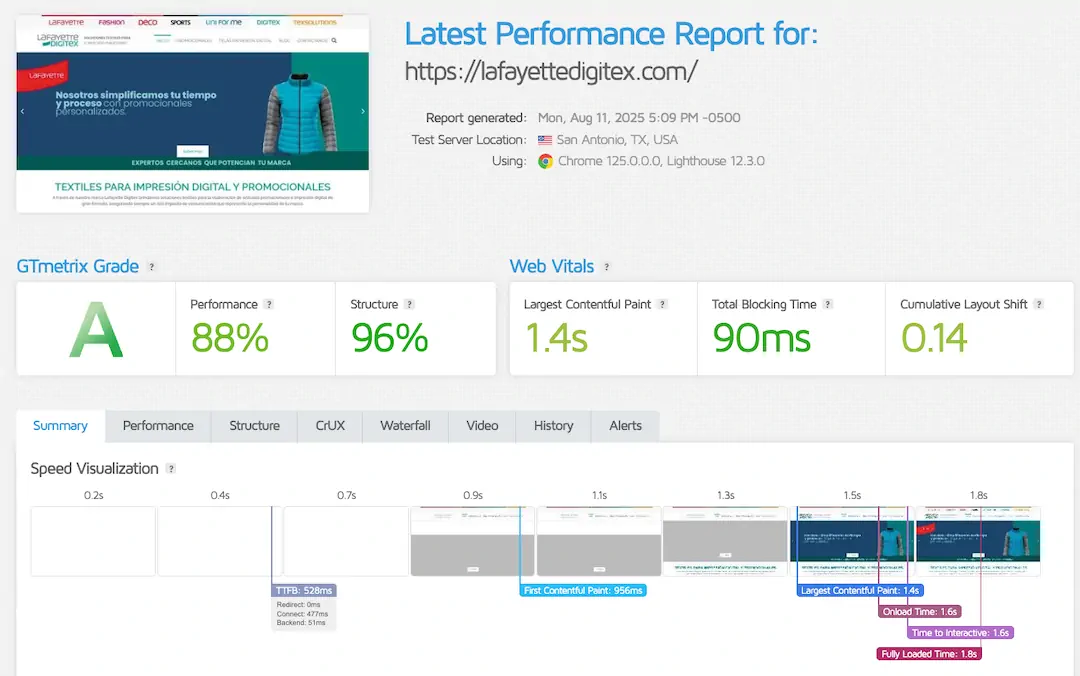
The loading speed is crucial for user experience and SEO. Tools like Google PageSpeed Insights, GTmetrix, or Pingdom help measure load times and suggest improvements such as:
- Optimize images.
- Implement deferred loading (lazy loading).
- Use a CDN (Content Delivery Network).
- Minify CSS and JavaScript.
2. Review the site structure and architecture
A site should be easy to navigate for both users and search engines. Check:
- That the pages are correctly linked.
- The presence of an updated XML sitemap.
- A proper hierarchy of headings (H1, H2, H3).
- Internal links that distribute SEO authority.
3. Evaluate mobile compatibility
More than 70% of web traffic in 2025 comes from mobile devices. Your site must be responsive, fast, and have buttons adapted for small screens.
4. Examine on-page SEO
Key aspects you should not overlook:
- Unique and optimized titles and meta descriptions.
- Strategic use of keywords.
- Friendly URLs.
- Original and valuable content.
- ALT tags on images.
5. Check off-page SEO
SEO depends not only on your site but also on external factors:
- Quality backlinks from trusted sites.
- Presence in related directories and media.
- Content marketing strategy to attract natural links.
6. Perform a content analysis
Evaluate if your content is:
- Relevant to your audience.
- Updated and free of duplicates.
- Written for humans but optimized for search engines.
- Enriched with visual elements (infographics, videos, images).
7. Verify site security
- Implement an SSL certificate (HTTPS).
- Constantly update CMS and plugins.
- Make regular backups.
- Protect contact forms with reCAPTCHA.
8. Analyze the user experience (UX)
Some indicators of usability issues are:
- High bounce rates.
- Forms that are too long.
- Lack of clear calls to action.
- Confusing navigation or too many clicks.
9. Study metrics with Google Analytics and Search Console
These tools allow you to analyze:
- Bounce rate.
- Pages with the most traffic.
- Keywords that generate visits.
- Indexing problems.
Recommended tools for a web audit
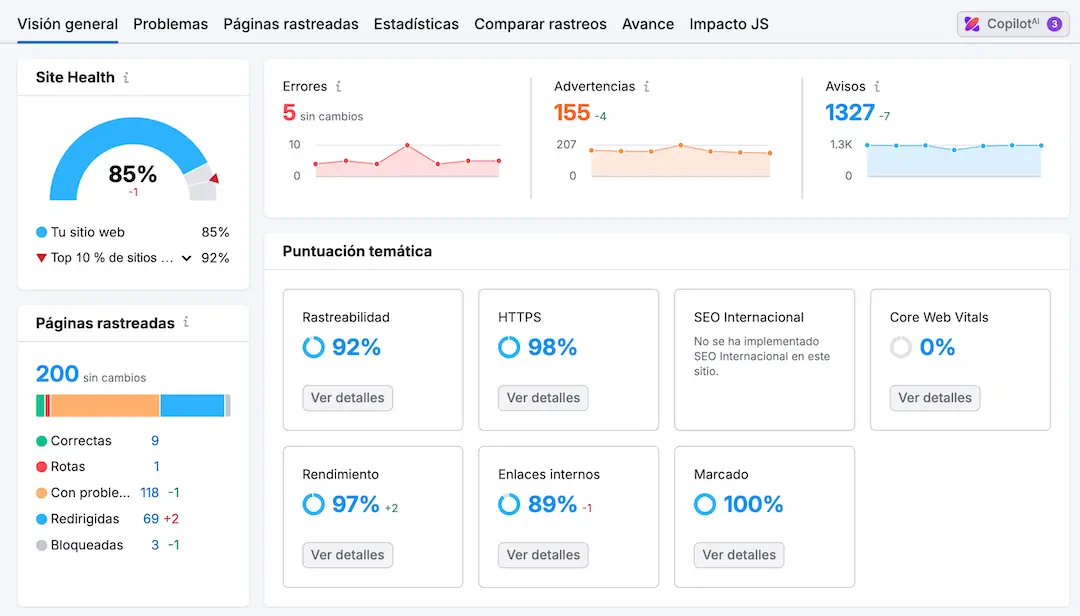
- SEMrush → Complete SEO audit of errors, backlinks, organic traffic, internal links, performance, among others.
- Screaming Frog → Technical crawling and error detection.
- Hotjar → Heatmaps and user recordings to improve UX.
- SEO Site CheckUp or SEOptimer → are online tools that generate automatic reports at the domain level. They help find general errors but are not recommended for detailed audits.
- Sistrix → ideal for analyzing site visibility and its organic traffic.
Best practices for auditing your website
- Conduct periodic audits: The ideal is to perform a web audit every 6 months or after a major redesign.
- Prioritize user experience: Google values user satisfaction. An audit should focus on speed, accessibility, and intuitive design.
- Document and measure results: Create a report with the issues found, the changes made, and the improved metrics.
- Combine SEO with content marketing: Content is the heart of any website. It’s not enough to optimize technically: you need to provide useful and relevant information.
Frequently Asked Questions (FAQs)
1. How often should I perform a web audit?
It is recommended at least every 6 months or whenever you notice drops in traffic or conversions.
2. Does a web audit improve SEO immediately?
It depends on the extent of the changes. Some improvements, like optimizing speed, can show results within weeks; others, like acquiring backlinks, take more time.
3. Can I perform a web audit without being an expert?
Yes, by using automated tools. However, a professional audit provides a deeper analysis.
4. What is the difference between a technical audit and an SEO audit?
The technical audit reviews performance and architecture, while the SEO audit focuses on keywords, metadata, and ranking.
5. Is a professional web audit expensive?
It depends on the size of the site. A basic analysis can be affordable, but comprehensive audits for large sites require a bigger investment.
In conclusion
Performing an audit on your website in 2025 is not a luxury, but a strategic necessity. Likewise, by following this step-by-step process you will be able to detect errors, optimize resources, and ensure that your website not only attracts visits but converts them into loyal customers.
At PIXELPRO we can help you optimize your website content and improve your search engine ranking, and why not, get it to be first in Google listings. Tell us about your project or request a free web audit.

I am a Communications Professional and Journalist with more than 7 years of experience as a Community Manager, Content Manager, and Web Content Writer.
I specialize in creating, planning, implementing, and evaluating social media strategies that help businesses strengthen their online presence, engage their audiences, and achieve their marketing objectives. I have extensive experience managing social media communities, developing content strategies, and producing high-quality digital content tailored to each client's goals and brand identity.


